To use Analytics, start by creating a new project by selecting New Project in the upper-right corner of the screen.
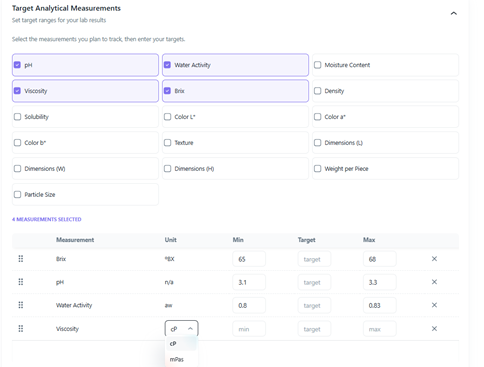
On the Project page, scroll down to Target Analytical Measurements. Here, you'll find 16 analytical measurements to choose from. Select the measurements you would like to associate with the project. Where applicable, choose the unit of measure from the dropdown menu. For each selected measurement, you can enter a minimum, target, and maximum value to define your desired ranges.
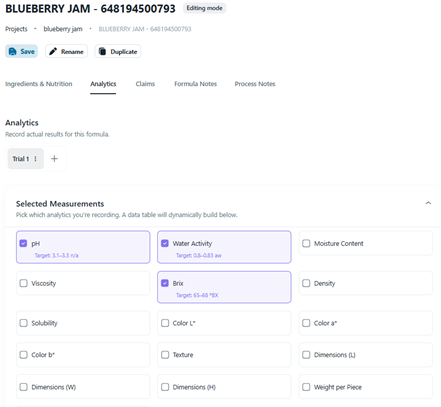
Complete the remainder of the project brief and create your formula as you normally would. Once you have a formula you'd like to evaluate, navigate to the Analytics tab, located next to Ingredients & Nutrition.
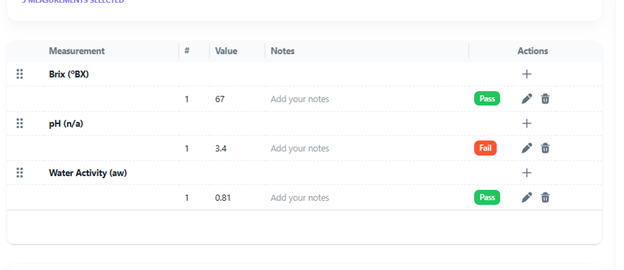
The analytical measurements selected in the project setup will automatically appear in the analytics table, where you can enter results from lab, pilot plant, or production trials. If you would like to record additional measurements, select the dropdown next to Selected Measurements and choose any additional analytical measurements you'd like to track.
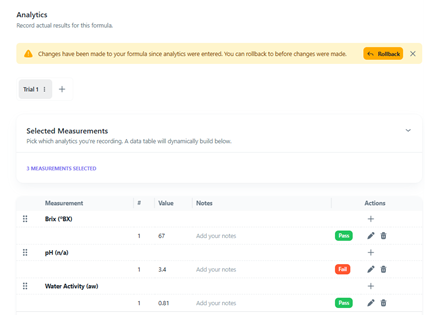
As values are entered, Analytics will compare them against the ranges established in the Project page. Measurements that fall within the specified range will display a green Pass indicator. Measurements that fall outside the range will display a red Fail indicator. If no range was defined, or only a target value was entered, no Pass/Fail status will be displayed.
Sous can view both the analytical results and the targets or ranges defined for the project. Through the Sous chat feature, you can discuss the results and receive suggestions for adjusting the formula to bring measurements back within the desired range.
If you apply changes to the formula through Sous chat, a yellow notification will appear in the Analytics tab indicating that the formula has changed since the analytical results were entered. This notification also provides the option to revert to the previous version of the formula that corresponds to those analytical measurements.